Health Tracker
Symptom Diary
For people who need to tell a doctor what actually happened, and when — instead of “it’s been bad lately, I think since maybe March?” It lives in your own Google Drive.
Why people install it
Nobody logs their bowel movements for fun
Everyone who ends up here is trying to answer something specific, usually after months of a hunch. These are the five we hear most.
-
“It’s definitely something I’m eating.”
You have eliminated gluten, then dairy, then — at one memorably bleak point — onions. You feel roughly the same. Log what goes in and what your gut does about it, and let six weeks of entries settle an argument that a hunch and an elimination diet have been losing since spring.
-
“It’s been bad for… a while now?”
The appointment is eight minutes long and you are going to spend three of them saying “a while now”. Bring the PDF instead. Every figure in it has the entries it came from printed underneath, so nobody has to take your word for it — or the AI’s.
-
“I know roughly what I eat.”
You know roughly what you eat in the same way you roughly know your bank balance. Photograph the plate; the app writes down what it sees and adds a calorie estimate you can edit. No target, no ring to close, and nothing congratulating you on a streak.
The photo and the estimate need a free Google Gemini key. It takes about a minute to create, and the free tier covers everyday use.
-
“Did I take it, or am I thinking of Tuesday?”
Set the schedule once and the doses turn up on your timeline by themselves. Tap the ones you took, mark the ones you didn’t, and stop reconstructing last week from memory while standing in the pharmacy queue.
-
“I blame the energy drinks.”
Bold theory. Log the blood pressure, log the third can, and find out whether you are right or whether you have been slandering a beverage. Your monitor and your scale can file their own readings through Health Connect while you get on with the accusing.
What makes it different
Six things it does not do
Most of the health-app industry is a subscription with a chart attached. This one was built by one person who wanted a log that didn’t nag, didn’t sell anything, and didn’t hold six months of symptoms hostage behind a renewal.
-
No account with us
There is no “us” to have an account with. You sign into your own Google Drive, and that is the entire sign-up flow. We do not know your email because we never asked for it.
-
No subscription
One price, once. Your log does not stop working because a card expired. Revolutionary, we know.
-
No ads, no analytics in the app
Nothing about you is sold, because nothing about you arrives. There is no server here to arrive at. Health data is the most valuable thing you own; the business model is simply not touching it.
-
No streaks, no nagging
Once a day it asks how you are feeling. Say no and it goes away. That is the only thing it will ever ask you for. No notifications at 9pm about your “journey”.
-
No AI making things up
Every number in every report is computed on your phone and handed to the model as fact. The model describes; it never counts. A figure in a report is one you can check against the Stats tab, or by hand.
Three things go to Google's Gemini, and only when you tap something — after the app has explained what it sends and you have agreed: a report, a meal photo, or one food entry you asked to have costed. Readings imported from Health Connect stay out unless you allow them. The privacy policy lists each one.
-
No lock-in
Export the whole thing to a file whenever you like. Delete everything from inside the app and it is gone from the phone and from Drive — not “scheduled for deletion within 90 days”.
The competition
An honest comparison, which is to say a smug one
| Health Tracker | The other one | |
|---|---|---|
| Where your symptoms live | Your Google Drive | Their Google Drive, so to speak |
| Cost | Once | Monthly, forever, rising annually |
| Six months from now | Still yours, still opening | “Renew to view your history” |
| Onboarding | Sign in, log something | Fourteen screens about your goals |
| Notifications | None | “We miss you 🥺” |
| Where the numbers come from | Computed on your phone | An LLM, doing arithmetic, confidently |
| Privacy policy length | Short, because there is little to disclose | Nine thousand words about “partners” |
| Streak counter | No | Day 47 🔥 and a small stab of guilt |
| Export for your doctor | A PDF with the entries behind every figure | A screenshot you took of a chart |
“The other one” is not a specific app. It is a composite, assembled with affection from the ones we uninstalled first.
What it looks like
Drag it. It’s a slider, not a slideshow
No carousel that moves on before you’ve read it. Drag, swipe, or use the dots.
What you can log
Eleven kinds of entry, and nothing you have to fill in
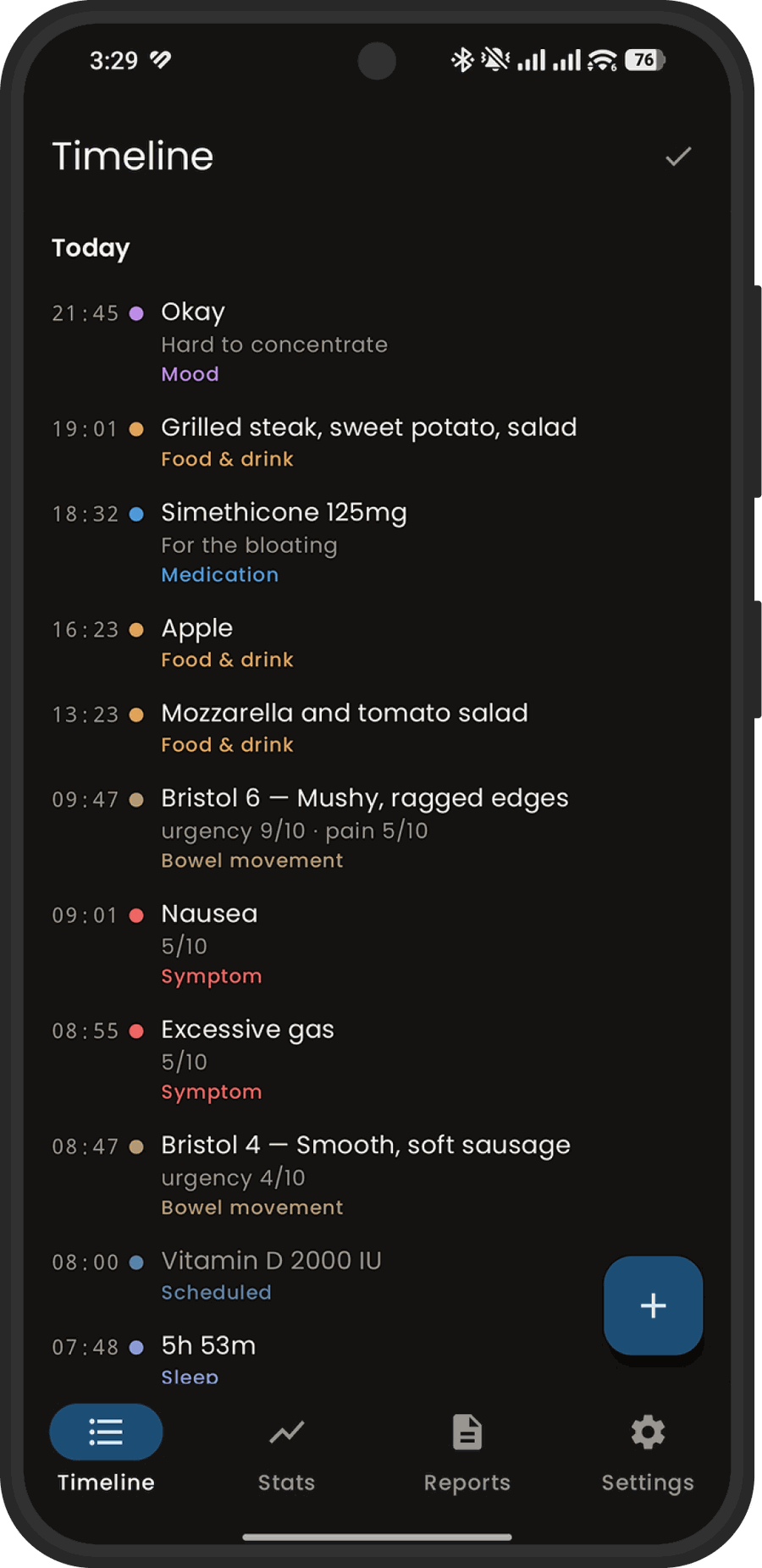
Log what matters to you and skip the rest. Most entries are a time and a line of text; the ones that need a number ask for one. Beyond that one line, every field is optional — no screen will hold your entry hostage until you rate something you don’t care about.
All eleven
- Food
- Bowel movements
- Medication
- Symptoms
- Events
- Exercise
- Mood
- Sleep
- Weight
- Blood pressure
- Glucose
Medication schedules
Set the times a pill is due and the app tracks what was taken, what was missed, and what that does to your adherence.
A PDF for the appointment
Export a factual summary with the figures behind it and every entry it was written from, so a doctor can check one against the other.
Photograph the food
Point the camera at the plate. The app writes down what it sees and adds a calorie estimate, which you can edit before saving. The picture is never stored — only the words.
Needs a free Gemini key. The free tier is plenty for everyday use.
Health Connect
Let the other apps do the typing
Health Connect is Android’s own hub for health data. Apps write to it, apps read from it, and Google stays out of the middle. Health Tracker reads from it — so a weight your scale recorded this morning, or a blood pressure you took in another app, lands on your timeline without you typing it twice.
It is off until you switch it on, one data type at a time, and it is read-only. The app never writes anything back. Your log is downstream of everything else and upstream of nothing.
Five types, individually
Weight, blood pressure, glucose, sleep and exercise. Turn on the ones you want and leave the rest off — this is not an all-or-nothing permission.
It won’t import twice
Each imported reading is matched to the moment it was taken, so re-importing the same week does not fill your timeline with duplicates.
Yours to edit
An imported entry is a normal entry. Change the wording, correct it, delete it — and the next import will leave your version alone.
It works especially well with the rest of the shelf
Two other CELEST apps write to Health Connect, which means they feed this one without either app knowing the other exists. Neither is required, neither is upsold, and nothing here stops working if you use somebody else’s app instead.
Where your data lives
In your Drive, in a folder only this app can open
You sign in with your own Google account the first time you open the app, so it can reach a folder in your Drive. That is the only sign-in there is — no account with us, and no server of ours. Your entries go straight from your phone into the private application folder, an area that does not show up among your files and that no other app, including anything of ours, can read.
A copy stays on the device so the app works offline. It is excluded from Android’s cloud backup and from device-to-device transfer, so it does not travel anywhere with the phone.
Why it asks for Google Drive at all
So your log survives a lost phone and turns up on your other devices — the same reason a notes app syncs. The permission it asks for covers its own private folder and nothing else: it cannot see, open or change any other file in your Drive, and it does not ask for anything wider. The privacy policy names the exact permission if you want to check it.
What it is not
Not a medical device
Health Tracker records what you tell it and describes patterns in it. It does not diagnose, it cannot examine you, and its reports are not medical advice. The pattern analysis is explicitly speculative, and says so in a fixed notice above every report. Take the factual summary to a doctor; take the analysis as a list of questions to ask one.
It is not intended for children, and it is not a substitute for professional care.
Getting it
One price, once
No subscription. No advertising. No analytics inside the app. Nothing about you is sold, shared, or used to sell you anything, because there is no mechanism here to do it with — the data never reaches us in the first place.